
Synchronize windows
Follow the original product screenshots to see how tabs, text, scrolling, and clicks are synchronized across browser windows.
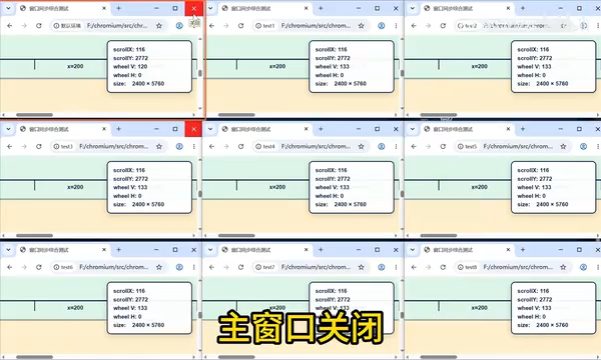
01 · Operate the lead window
The lead browser has an orange-red border. In the article demonstration, closing its current tab closes corresponding tabs in follower windows. Each profile retains its own cookies and proxy.

02 · Synchronize text and page actions
Typing Chinese or English in the lead window appears in followers. Scrolling, zoom, and tab switching can also follow. Open corresponding pages in each window and check the result.


03 · Check windows when pages diverge
Ads, dialogs, and layout differences can put the same click over different elements. Inspect each browser, resolve obstructing content if needed, and then continue from the lead window.

04 · Finish and handle separate challenges
Closing the lead window ends the synchronized group. A website may show a separate verification in each profile; complete it manually in the affected window.

Common questions
- Which window should I operate?
- Use the orange-red bordered lead window. Followers retain separate profile data.
- What if a follower shows a different page?
- Inspect and correct that window separately before continuing; a synchronized click cannot guarantee identical outcomes on different page layouts.
Based on the author’s Bilibili product walkthrough ↗. Original screenshots are preserved and may show Chinese interface labels.
Watch the window synchronization walkthrough
Click play to watch here. The video is narrated in Chinese.
If the player cannot load, open the video on Bilibili ↗